sample04_template리터럴.html
<script>
        //template 리터럴
        //1. 문자열 처리 방법
        let s1 = "hello";
        let s2 = 'hello';
        let s3 = `hello`;
        console.log(s1, s2, s3);

    </script>
`` 안에 문자열 넣을 수 있음 이 안에서는 띄어쓰기나 엔터 다 유지됨
//2. template 리터럴 용도
        var name = 'hello2';
        var s="<table> \
                <tr>\
                    <td>"+name + "</td>\
                </tr>\
                </table>";
        console.log(s);
        var s=`<table>
                <tr>
                    <td>${name}</td>
                </tr>
                </table>`;
        console.log(s);
let aaa = '홍길동';
        let bbb = 20;
        let ccc = '서울';
        let result = `이름은 : ${aaa}, 나이는 : ${bbb}, 주소는 : ${ccc}`;
        console.log(result);
sample05_함수1_생성방법.html
<script>
        //함수 작성 방법
        //1. 함수 선언식(이름있는 함수)
        function fun() {
            console.log("fun() 호출");
        }
        fun(); //호출

        //2. 함수 표현식 (익명함수)
        var fun = function(){
            console.log("fun() 호출");
        }
        fun();
    </script>
sample05_함수2_일급객체_콜백.html
<script>
        //함수 특징(일급객체)
        function fun() {
            console.log("fun()");
            // return 10;
        }
        var a = fun();//함수 호출 리턴 값 저장
        var x = fun; //1. 변수에 함수 자체를 저장 가능
        x();
    </script>
function fun2() {
            return fun; // 2. 함수의 리턴 값으로 사용가능
            //return fun(); //10리턴
        }
        var x = fun2();
        x();
 function fun3(x) {
            x(); //3. 함수의 인자갑승로 사용가능
        }
        fun3(fun);
 // 응용 : 콜백 함수
        function call(x) {
            x();
        }
        function callback() {
            console.log("callback();");
        }
        function callback2() {
            console.log("callback()2;");
        }
        call(callback);
        call(callback2);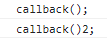
sample05_함수3_default_rest.html
<script>
        //다향한 함수 형식
        //1. 기본함수 특징 => 인자 갯수가 달라도 됨
        function fun(n, n2, n3) {
            console.log(n, n2, n3);
        }
        fun();
        fun(1);
        fun(1, 2);
        fun(1, 2, 3);
    </script>
//2. default 파라미터
        function fun2(n=-1, n2=-2, n3=-3) {
            console.log(n, n2, n3);
        }
        fun2();
        fun2(1);
        fun2(1, 2);
        fun2(1, 2, 3);
 //3. rest 파라미터
        function fun3(n, n2, ...rest) {
            console.log(n, n2, rest);
        }
        fun3(1,2,3,4,5);
반드시 ... 이 맨 마지막에 와야함
sample05_함수4_중첩함수.html
 <script>
        //중첩 함수의 사용
        //1. 중첩 함수 선언식
        function x(arg) {
            function y(n) {
                return n*10;
            }
            return y(arg); //리턴 값을 리턴
        }
         //외부에서 접근 방법
        var result = x(3);
        console.log(result);
    </script>
 //2. 중첩함수 표현식
        var a = function (arg) {
            var b = function(n){
                return n*100;
            }
            return b(arg);
        }
        var result2 = a(2);
        console.log(result2);
 //3. 은닉화
        var k = function(){
            var d = 10;
            var k2 = function(){
                return d*2;
            }
            return k2();
        }
        console.log("k()호출 : ", k());

○ 람다 함수 ( arrow 함수 )
- 람다 함수는 일반적인 함수 표현식을 function키워드 없이 => 이용하여 표현한 방법
function test(a,b){
return a+b;
}
var test =()=>a+b
sample05_함수5_arrow.html
<script>
        //arrow 함수
        //1. 파라미터 없고 리턴값 없는 형식
        function fun() {
            console.log("fun()호출");
        }

        const x = ()=> {console.log("arrow-fun()");};
        const x2 = ()=> console.log("arrow-fun()222");
        x();
        x2();
    </script>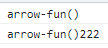
//2. 파라미터 있고 리턴값 없는 형식
        function fun2(n, n2){
            console.log("fun2() ", n, n2);
        }
        const x3 = (n, n2)=> console.log("arrow-fun2: ", n, n2);
        x3(1,2);
//3. 파라미터 없고 리턴값 있는 형식
        function fun3(){
            return 100;
        }
        const x4 = ()=> "arrow-fun3 : "+100;
        console.log(x4());
 //4. 파라미터 있고 리턴값이 있는 경우
        function fun4(n, n2) {
            return n*n2;
        }
        const x5 = (n, n2)=> n*n2;
        console.log("func4 : ", x5(10,2));
//주의점 : arrow 함수는 this 바인딩 안됨
        //arrow 함수에서 this는 window 객체임
        //따라서 객체의 메서드를 생성할 때는
        //사용하지 않도록 한다.

        var user={
            n:999,
            b:function(){
                console.log(this, this.n);//n=999
            },
            c:()=> console.log(this, this.n) //window 객체, undefined
        }
        user.b();
        user.c();
arrow 함수에서는 this는 현재 페이지 전체
sample05_함수5_arrow2.html
function test1(){
console.log("test1");
}
 //1.
        const test1 = ()=> console.log("test1");
        test1();
function test2(a,b){
console.log("test2");
console.log("test2 : ",a , b);
}
const test2 = (a, b)=> {
            console.log("test2");
            console.log("test2 : ", a, b);
        };
        test2(1, 2);
function test4(){
return "test4 리턴됨"
}
 const test4 = ()=>"test4 리턴됨";
        console.log(test4());
function test5(){
console.log("test5 호출");
return "test5 리턴됨"
}
const test5 = ()=>{
            console.log("test5호출");
            return "test5 리턴됨";

        };
        console.log(test5());
function test6(a,b){
return "test6 리턴됨"+(a+b);
}
const test6 = (a,b)=> "test6 리턴됨"+ (a+b);
        console.log(test6(1,2));
function test7(a,b){
console.log("test7호출");
return "test7 리턴됨"+(a+b)
}
const test7 = (a,b) => {
            console.log("test7호출");
            return "test7 리턴됨" + (a+b);
        };
        console.log(test7(1,2));
멤버변수를 따로 안적고 this. 하면 자동으로 생성됨
sample06_클래스1_기본.html
<script>
        //클래스 : 프로퍼티 변수 선언 필요없음
        class Person{
            //기본생성자가 포함됨
            setName(name){
                this.name = name;
            }
            setAge(age){
                this.age = age;
            }
            getName(){
                return this.name;
            }
            getAge(){
                return this.age;
            }
        }//end class
        var p = new Person(); //객체 생성
        p.setName("홍길동");
        p.setAge(10);

        console.log(p.getName());
        console.log(p.getAge());
    </script>
sample06_클래스2_set_get.html
 <script>
         //클래스 : 프로퍼티 변수 선언 필요없음
         class Person{
            //기본생성자가 포함됨
            set  setName(name){
                this.name = name;
            }
            set  setAge(age){
                this.age = age;
            }
            get   getName(){
                return this.name;
            }
            get    getAge(){
                return this.age;
            }
        }//end class

        var p = new Person();
        p.setName = "홍길동"; //변수 처럼 함수 호출
        p.setAge = 10;

        console.log(p.getName);
        console.log(p.getAge);
         console.log(p.name);
        console.log(p.age);
    </script>
sample06_클래스3_표현방식.html
<script>
         //표현식 클래스 : 프로퍼티 변수 선언 필요없음
         var Person = class {
            //기본생성자가 포함됨
            set  setName(name){
                this.name = name;
            }
            set  setAge(age){
                this.age = age;
            }
            get   getName(){
                return this.name;
            }
            get    getAge(){
                return this.age;
            }
        }//end class

        var p = new Person();
        p.setName = "홍길동"; //변수 처럼 함수 호출
        p.setAge = 10;

        console.log(p.getName);
        console.log(p.getAge);
        console.log(p.name);
        console.log(p.age);
    </script>
sample06_클래스4_생성자.html
<script>
        //클래스
        class Person{
            //생성자는 constructor로만 사용가능
            //생성자 : 단 한개만 지정가능
            //만일 생성자가 작성되지 않으면 기본 생성자 생성됨
            constructor(name, age){
                this.name = name;
                this.age = age;
            }
            setName(name){
                this.name = name;
            }
            setAge(age){
                this.age = age;
            }
            getName(){
                return this.name;
            }
            getAge(){
                return this.age;
            }
        }//end class
        var p1 = new Person();
        p1.setName("aaa");
        console.log(p1.getName());
        var p = new Person("홍길동", 20);
        console.log(p.getName());
        console.log(p.getAge());

    </script>

* 상속 ( inheritance )
- ES6에서는 자바와 같이 extends 키워드로 상속 표현.
- 부모 클래스의 멤버를 자식 클래스가 상속 받아서 사용 가능
constructor와 상속
1. 자식 클래스와 부모 클래스 양쪽 constructor를 작성하지 않아도 인스턴스 생성 된다. ( default constructor 사용 )
2. 부모 클래스에만 constructor를 작성하면, 자식 클래스의 ‘default 생성자’가 호출되고
부모 클래스의 constructor가 호출된다.
3. 자식 클래스에만 constructor를 작성하면 자식 클래스의 constructor가 호출되고
반드시 부모 constructor를 명시적으로 호출해야 된다.
4. 자식과 부모 클래스 양쪽 constructor를 작성하면 자식 constructor가 호출되지만
반드시 부모 constructor를 명시적으로 호출해야 된다
sample06_클래스4_생성자2.html
<script>
        //클래스
        class Vue1{
            constructor({el, data, methods}){ //object를 인자로 받음
                console.log(el, data, methods);
            }
        }// end class
        var p = new Vue1({el:100, data:200, methods:300});
    </script>
sample06_클래스5_상속1.html
 <script>
        //상속
        //2.  클래스 기본
        class Pet{
            constructor (name, age){
                this.name = name;
                this.age = age;
            }
            setName(name){
                this.name=name;
            }
            getName(){
                return this.name;
            }
        };

        class Cat extends Pet{
            constructor(name, age, gender){
                super(name, age);
                this.gender = gender;
            }
        };

        var cat = new Cat('고양이', 10, '암컷');
        console.log(`${cat.name}, ${cat.getName()}`);
        console.log(cat.age, cat.gender);
    </script>
sample06_클래스5_상속2.html
<script>
        //상속
        //2.  클래스 기본
        class Pet{
            constructor (name, age){
                this.name = name;
                this.age = age;
            }
            info(){
                return this.name+"\t"+this.age;
            }
        };

        class Cat extends Pet{
            constructor(name, age, sex){
                super(name, age);
                this.sex = sex;
            }
            info(){ //메소드 오버라이딩
                return super.info()+"\t"+this.sex;
            }
        };

        var cat = new Cat('고양이', 10, '암컷');
        console.log(cat.info());
    </script>
sample06_클래스7_static메소드.html
 <script>
        //static 함수
        class Person{
            getPerson(){ //일반함수는 객체 생성 후 사용
                return "hello";
            }
            static getXXX(){
                return "world"; //static 메소드는 클래스명, 매소드형식으로 참조
            }
        }
        console.log(Person.getXXX());
        let p = new Person();
        console.log(p.getPerson());
    </script>
'코딩공부 > vue' 카테고리의 다른 글
| 3/30 (0) | 2023.03.30 |
|---|---|
| 3/29vue 시작 (0) | 2023.03.29 |
| 3/29 (0) | 2023.03.29 |
| 3/24 ECMAScript 6 (0) | 2023.03.24 |


